Features
Everything Planitude does, free and with no fine print
This page lists only the features available in the app today. Current limitations are listed in the detailed comparison.
AI assistant
An AI assistant that knows your plan
It is available on every page of the app and uses the open project as context. Its answers are based on your plan’s data, not on generic advice.
- Questions on progress, delays, workload and the forecast finish date
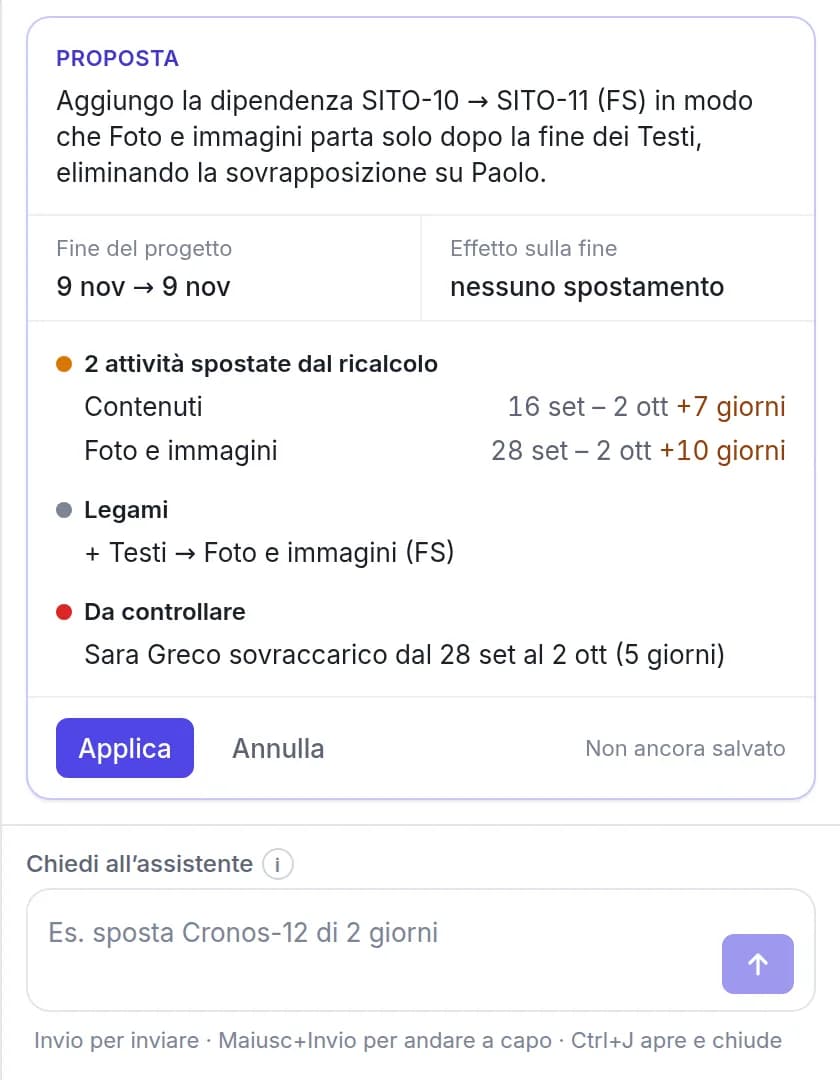
- Changes in plain language (“move SITE-12 by two days”), with a preview and confirmation before they are applied
- A full plan from a description: phases, tasks, links and milestones, with dates computed by the engine
- Also available outside a project, for questions across all your projects
- Suggestions as you type the name of a new task, in the Gantt and List views: duration, assignee and predecessor, accepted with Tab
- AI check of every proposed change (no issues, review before applying or risky), with the reasons and whether it matches your request
AI agents
AI agents as team members
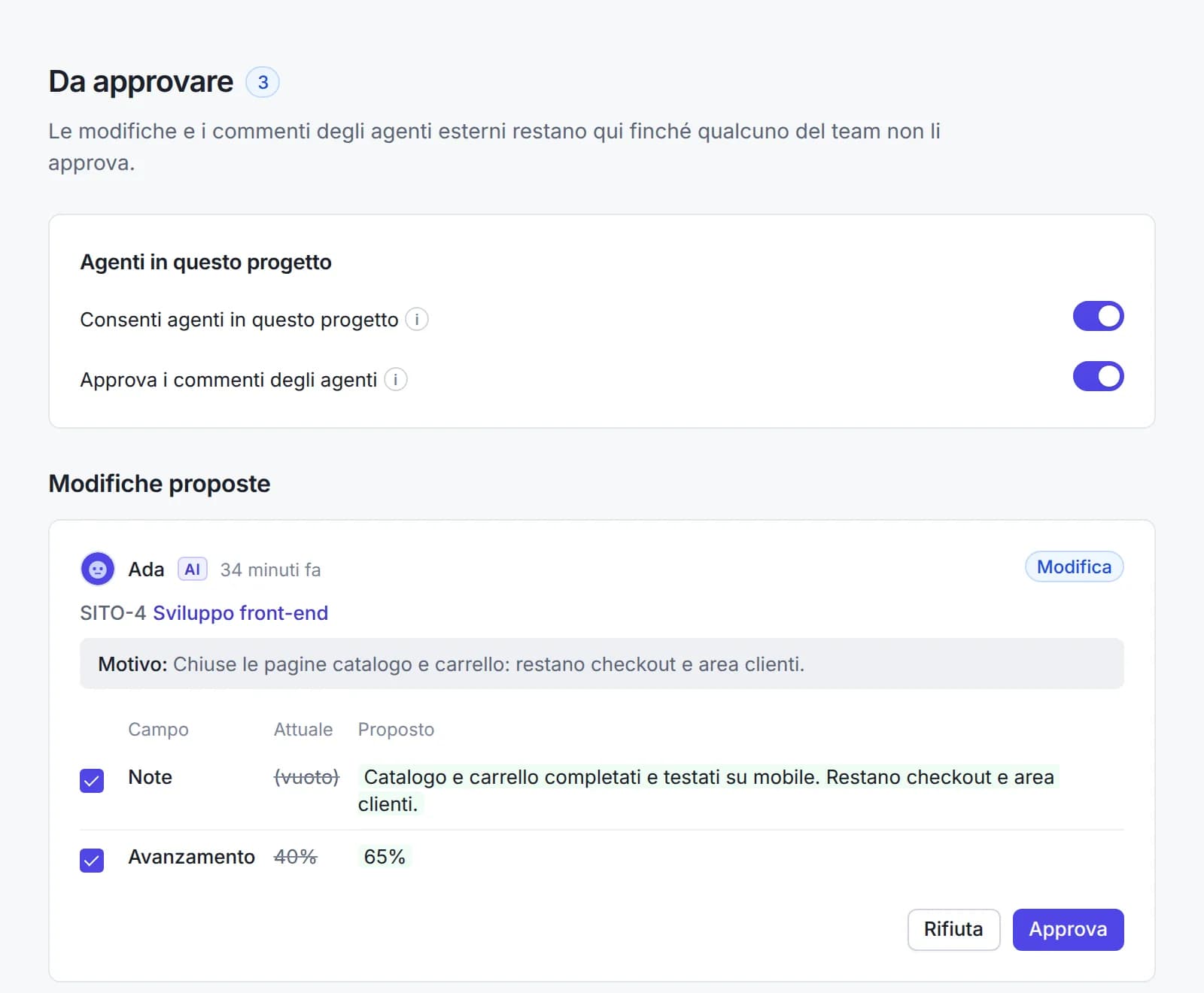
Connect the AI agents you already use to your workspace. They work only in the projects you assign them to and carry out the tasks you give them, on their own or with your approval.
- Claude Code, Cursor, Codex, Gemini CLI, GitHub Copilot or any MCP client with an API key
- Mention an agent in a comment or assign it a task, like any colleague
- Viewer role to read and comment, editor role to change tasks too
- Autonomous or With approval: history of every change, one-click Restore and an emergency stop
- Up to 5 agents per workspace, free, and they do not count as users
Import and export
Import Microsoft Project files and export in the same formats
Drag in a file and review a preview before the project is created. The import report lists any element that could not be mapped.
- Microsoft Project .mpp and .mpt templates, .mpx and Project XML (MSPDI)
- Primavera P6 .xer and PMXML, plus desktop formats such as ProjectLibre (.pod) and GanttProject (.gan)
- Tasks, hierarchy, durations, links, constraints, calendars, baselines, actuals and fixed costs are imported; resources are listed in each task’s notes
- Export to Microsoft Project XML, CSV for Excel, PNG image and multi-page PDF (A4, A3, Letter)
- Import from Excel and CSV spreadsheets, with phases rebuilt from the WBS or indentation and an editable column mapping

Scheduling
A complete scheduling engine
Dates come from links, constraints and calendars. Change a duration and the engine recalculates everything else, the way Microsoft Project does.
- Finish-to-start, start-to-start, finish-to-finish and start-to-finish links, with lead and lag
- Constraints (“start no earlier than”), deadlines and manually scheduled tasks
- Calendars with working weeks, public holidays and exceptions
- Critical path and total float, displayed on demand
- Subtasks on unlimited levels, with Tab and Shift+Tab as in Project
- Grid you can navigate with the keyboard like a spreadsheet: arrow keys, Enter or F2 to edit, Tab to move to the next cell
- Group colours: a summary task’s colour flows to its whole branch, with tinted rows and progress in the same colour
- New tasks start today, from the Gantt chart, the list and the assistant; a date you set is always respected
Waterfall and Agile (Scrum)
Waterfall or Agile (Scrum), with a delivery date
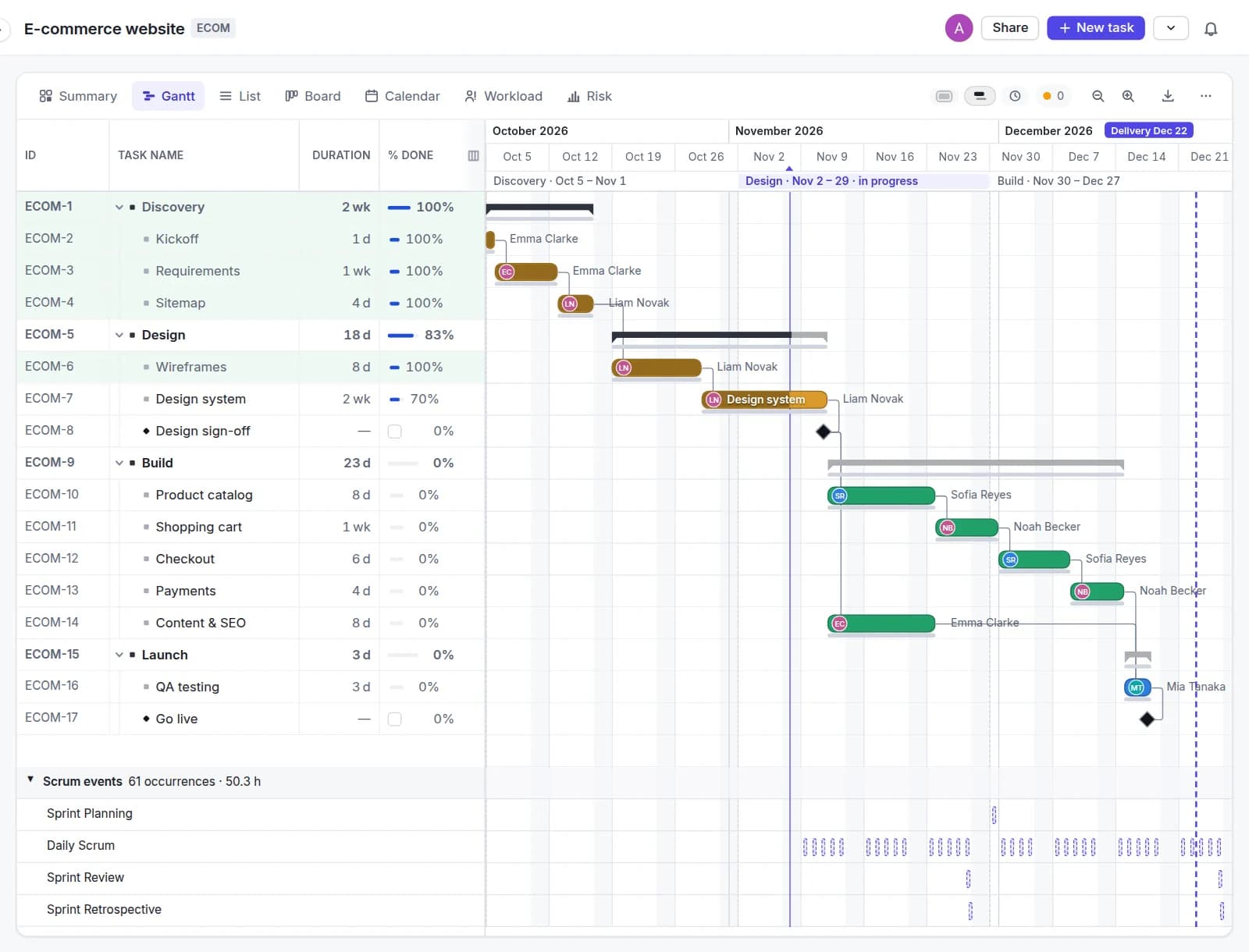
When you create a project, choose how the team works: phases in sequence up to delivery, or sprints, work cycles of 1 to 4 weeks with the Scrum events. Either way you set the delivery date: the Gantt shows it and warns you if the plan runs past it.
- The delivery date is a line in the Gantt. If the plan runs past it, the warning says by how much (“The plan finishes on December 23, 5 days after delivery”) and which activities cause the delay
- Backward planning: give the delivery date and Planitude works out when to start, placing each activity as late as possible. The Microsoft Project export keeps scheduling from the finish date
- Sprints of 1 to 4 weeks created automatically in the Gantt and the Calendar, each with a name and a goal
- Scrum events, the fixed meetings of every sprint (Sprint Planning, Daily Scrum, Sprint Review, Sprint Retrospective), already added with the Scrum Guide maximum durations scaled to the sprint length
- Edit an event for this sprint only, or from this sprint on. Events never move activity dates
- The workload also counts recurring activities (for example 2 hours every week), without moving the plan, and group resources such as “Team”, 5 people
- Switch from Waterfall to Agile (Scrum) and back with a preview of what changes. Activities stay where they are, and Planitude saves a version before the switch
Progress and delays
Identify delays and their extent immediately
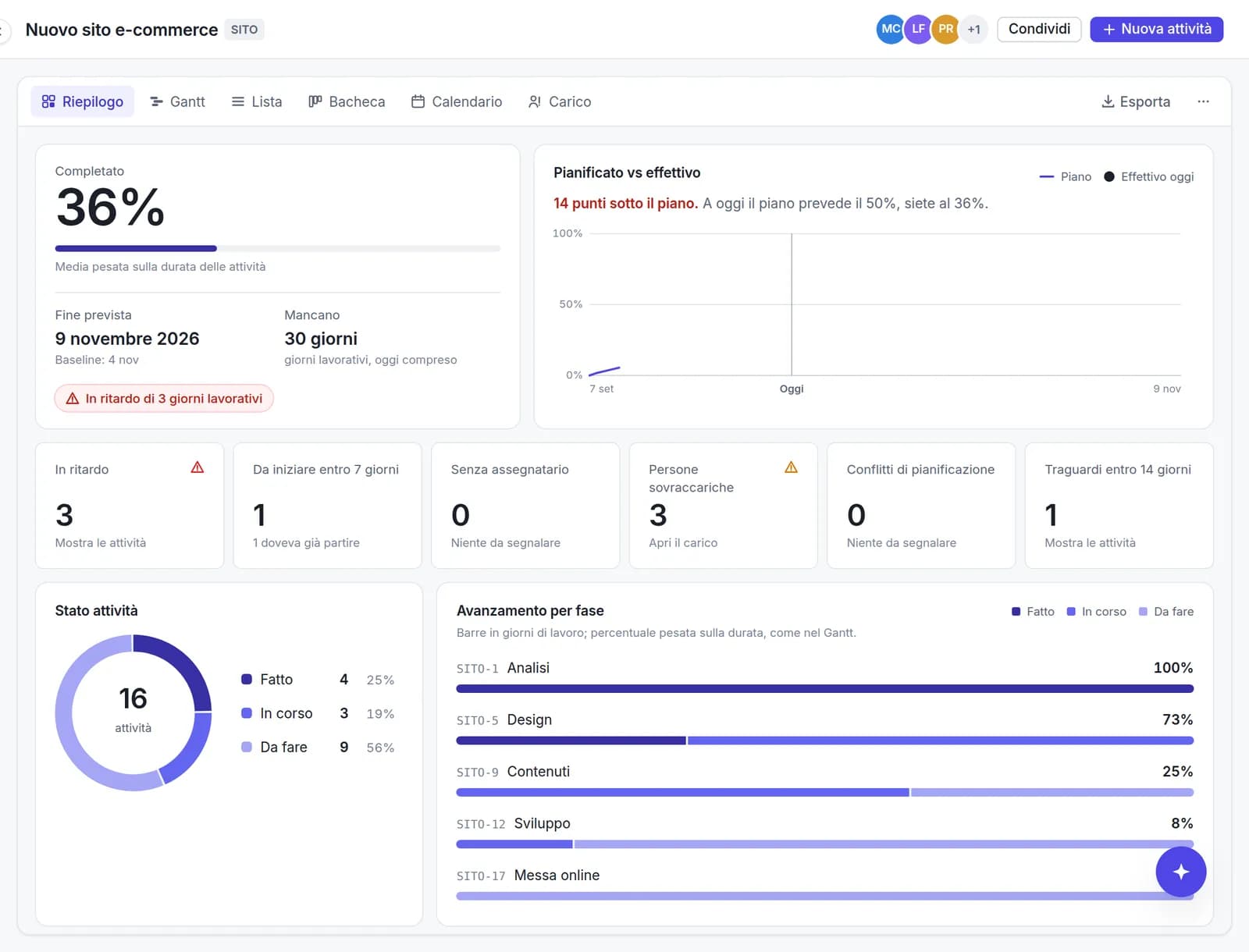
Planitude saves the baseline automatically at the first progress update. From then on, the Gantt chart and the Summary show which tasks are late.
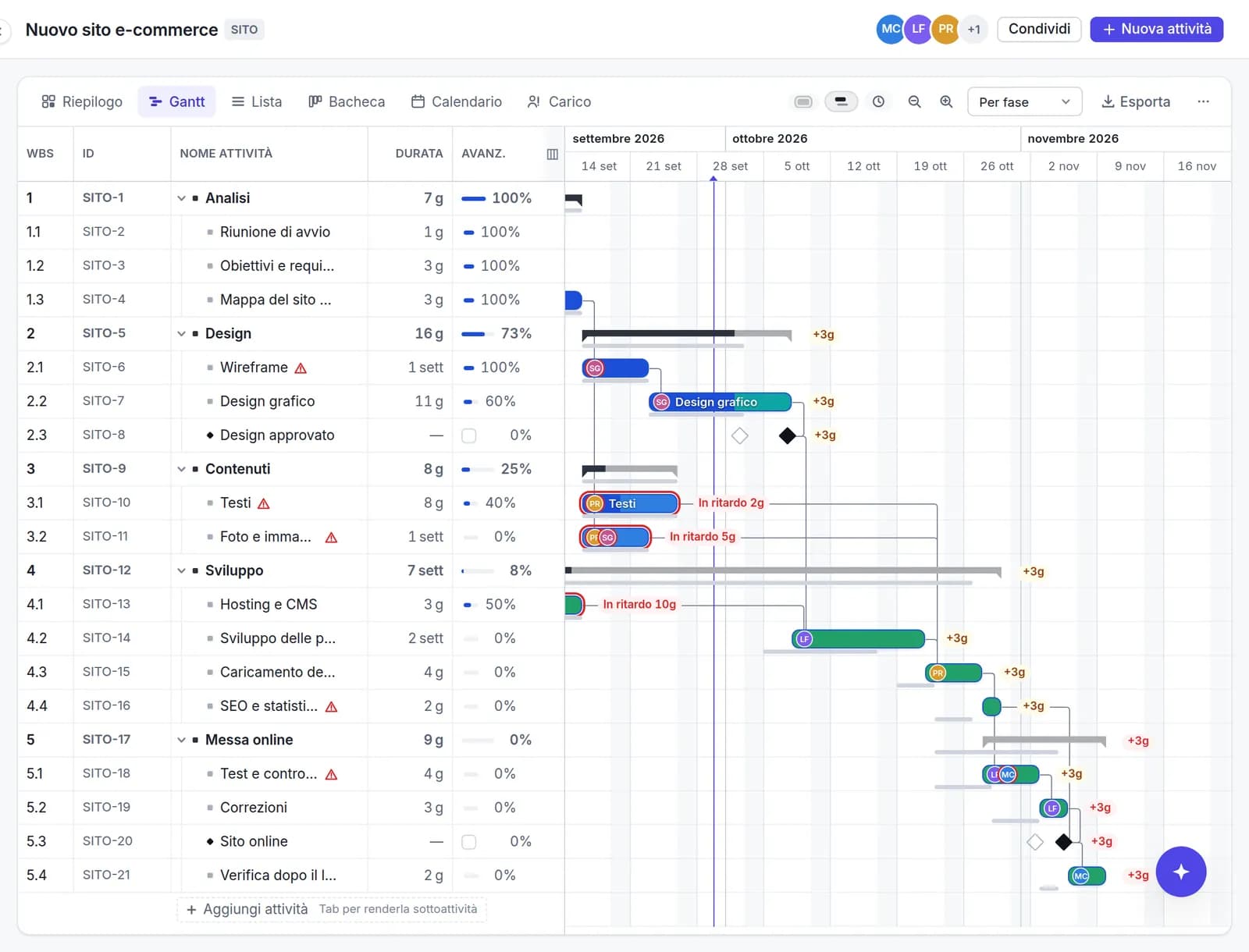
- Baseline bars and slippage in working days (+3d)
- Overdue tasks, tasks behind plan and tasks moved since your last visit
- Progress entered directly in the cell, “complete” in one click and “update to today”
- Version history with preview and restore, plus undo and redo
- Clearer Summary warnings: if a task starts before the project, “Move the project start” fixes it in one click
- Links turn red when a delay exceeds the slack and spreads along the chain; hover to see how far each task moves
Risk
How likely you are to finish on time
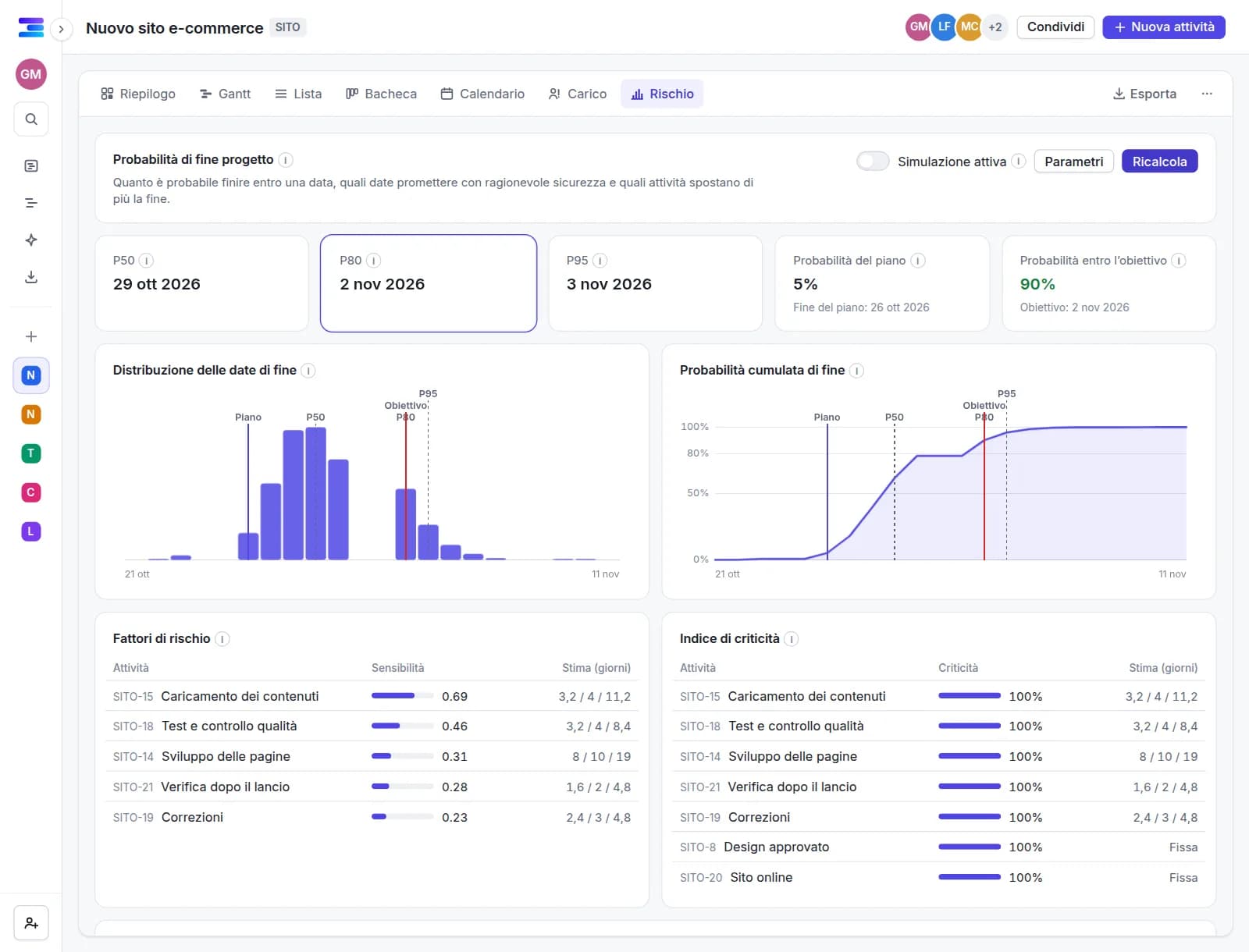
The Monte Carlo simulation recalculates the plan thousands of times, drawing each duration independently between optimistic and pessimistic (PERT or triangular) while respecting links, constraints and calendars.
- P50, P80 and P95 finish dates and the probability of meeting the planned finish, the deadline or a date you choose
- Risk drivers and criticality index: the tasks that move the project finish the most
- Three-point estimate per task; the others use the project’s default range
- Completed tasks and actuals stay fixed; for tasks in progress only the remaining work is simulated
- Histogram and S-curve; computed in the browser without freezing the page, with a reproducible seed
- AI estimate of the delay risk for every open task: an amber or red dot with the probability and main factors, and an “At risk” filter in the Gantt and List views
Views
Six views of the same plan
Each view has its own URL, so a link reopens exactly that view. The data remains consistent across views.
- Summary: completion, planned versus actual, delays and upcoming deadlines
- Gantt and List with multi-select, copy and paste to and from Excel
- Kanban board by status, and a Calendar
- Workload per person, with an over-allocation warning
- In the Gantt chart: note icon with preview next to the name, completed rows highlighted and long names that scroll
Portfolio
All your projects in a single view
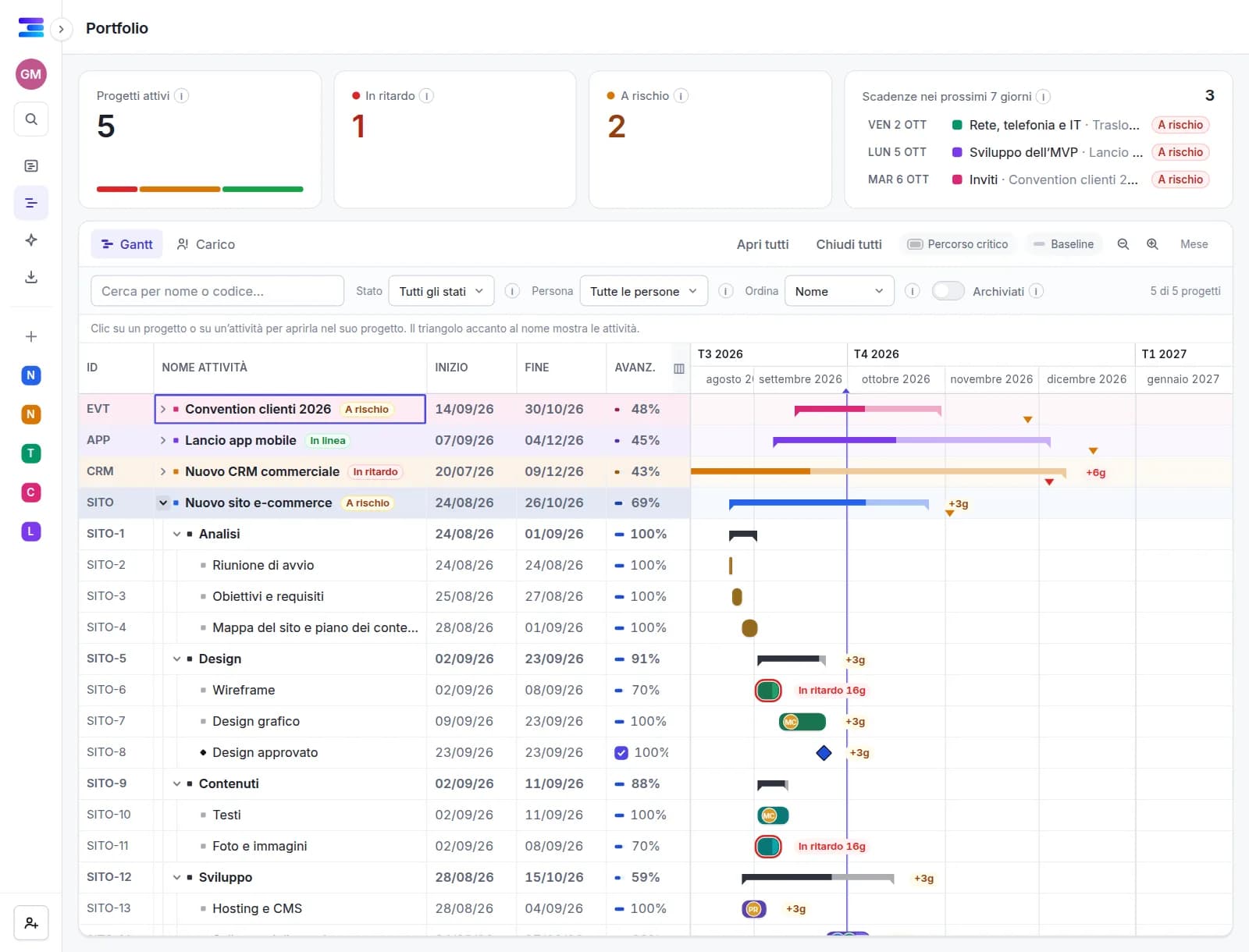
The portfolio brings the projects you can see into one Gantt chart, with a status based on the same rules as the Summary, and adds up each person’s workload across every project.
- One row per project with status, progress, dates, baseline variance and deadline; expand it to see the tasks
- Automatic status: on track, at risk, late or completed
- Workload across projects: someone working on several projects appears on a single row
- Indicators at the top: active projects, late, at risk and deadlines in the next 7 days
- Filters by name, status, person and archived projects; one click opens the project or the task
- AI estimate of each project’s health on four levels, with a “To review today” section for the projects that need attention
Team
Real-time teamwork with no per-seat fees
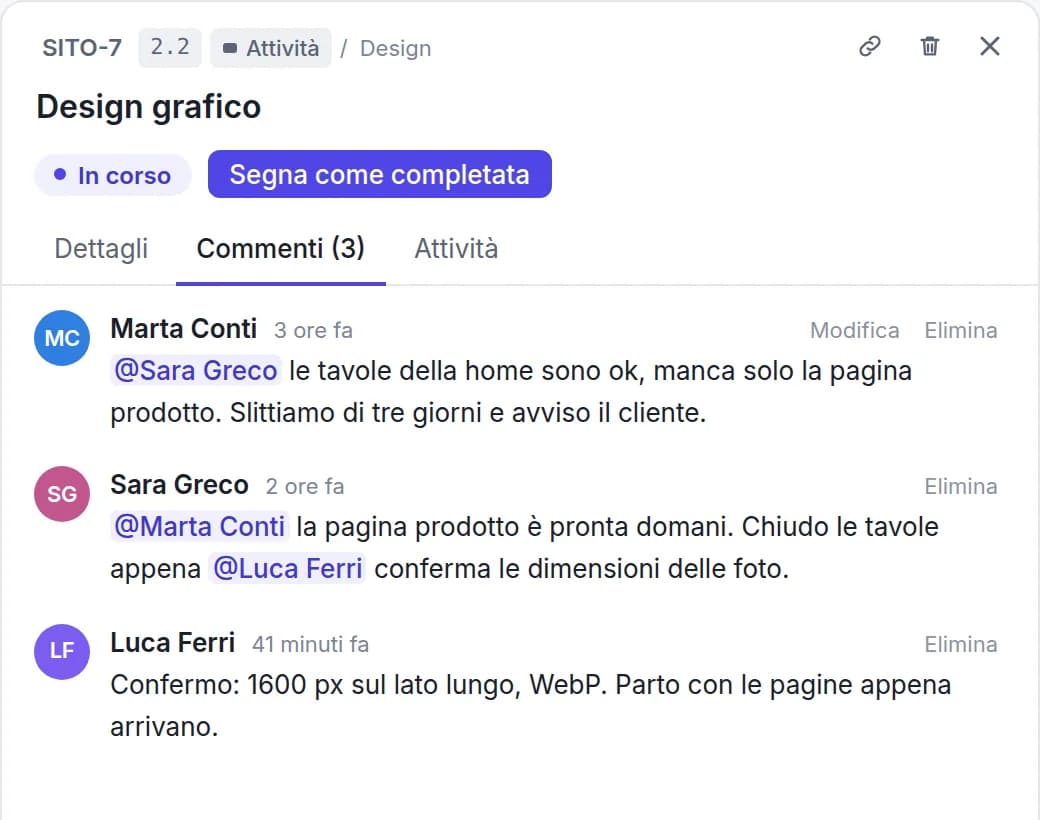
Several people can edit the same plan at once and see each other’s changes as they happen. Each task has a panel with its details, comments and change history. Viewers are free of charge.
- Invitations by email or link, with roles: owner, editor, viewer
- Comments with @mentions and per-task change history
- Jira-style task keys (SITE-12) and direct links to every task
- Read-only public link for people without an account, revocable
- Profile photos on the bars show at a glance who is responsible for each task
- Real-time co-editing: who is online, the task each colleague has selected and their changes within a second
- Invitations and acceptances as real-time notifications in the bell, with a button to join the project
Reminders and calendar
Deadlines come to you, by email and in your calendar
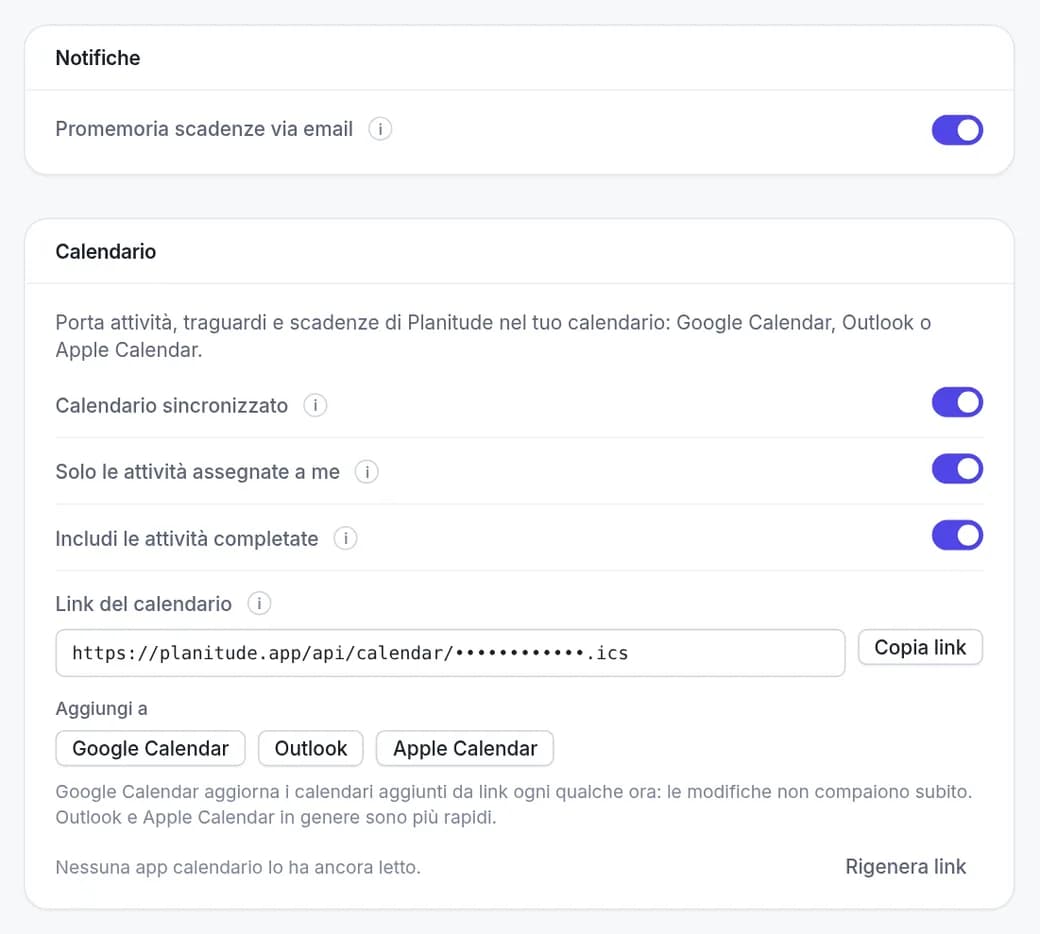
Every morning Planitude emails only the people who have something due, grouped by project. Calendar sync brings tasks into the calendar app you already use.
- Email at 8:00 (Central European Time) listing the tasks due on the next working day
- 3 working days’ notice for long tasks, plus overdue tasks and deadlines that are approaching or missed
- Reminders can be turned off in your profile or with one click from the email
- Private iCal link for Google Calendar, Outlook and Apple Calendar: all projects or just one, your tasks or everyone’s
- The link can be revoked and regenerated at any time
Templates
Start from a template, not a blank page
13 templates with phases, durations, links and milestones already set, translated into all 24 languages.
- Website, product launch, software sprints, marketing campaign, event, onboarding
- ERP/CRM, office move, shop opening, home renovation, thesis, wedding
- Save one of your projects as a template and reuse it
- Duplicate, archive and mark projects as favourites

Integrations
Connected to the tools your team already uses
Planitude stays the plan, the other tools stay where people work: tasks sync with Jira and Azure DevOps, updates reach Slack and Teams, deadlines reach the calendar, and AI assistants read and update plans through MCP.
- Two-way sync with Jira Cloud and Azure DevOps Boards: Planitude owns names, dates and dependencies, the work tool owns status and assignee
- Project updates in a Slack or Microsoft Teams channel, plus a Teams tab with the Gantt chart
- ChatGPT, Claude.ai and Gemini connect with OAuth; Claude Code, Codex, Gemini CLI, Cursor and VS Code also with an API key
- Read-only or read-write access, revocable at any time from your profile
- REST API with OpenAPI 3.1 and signed webhooks for your own automations
- Telegram: ask the AI assistant how your projects are going, from your phone and read-only

Free, in the browser
Free, in the browser, in 24 languages
No licences and nothing to install: an account is all you need.
- Works in any modern browser, no plug-ins
- Sign up with email or with Google
- English, Italian, Spanish, French, German, Portuguese, Dutch, Polish, Japanese, Chinese, Swedish, Danish, Norwegian, Finnish, Czech, Romanian, Ukrainian, Turkish, Arabic, Hebrew, Hindi, Indonesian, Vietnamese and Korean
- Data on servers in the European Union (Germany)
Try Planitude with a real plan
Import an .mpp file, start from a template or describe the project to the assistant. It takes two minutes and requires no licence.